


NABARD Grade A Application Process 2026, Registration Fees & Steps to Apply Online
If you're aiming for a career in banking or rural development, the NABARD Grade A exam is a solid opportunity. It offers a respected officer-level role that comes with good pay, stability, and strong long-term growth prospects.
Competition for this exam runs high, but with the right guidance and consistent effort, clearing it is entirely achievable. It's not just an exam, rather, it's a pathway to a meaningful and secure career.
Download the study material for free
Before applying, it's worth understanding the complete NABARD Grade A online application process, the documents you'll need, and the applicable fees. Knowing these details ahead of time helps you steer clear of mistakes during registration and makes the whole process go much more smoothly.
Candidates will need to complete NABARD Grade A registration, enter their personal and educational details, upload the required documents, and pay the application fee in order to successfully submit their form.
Let us help you by breaking everything down in a simple, easy-to-follow manner. We will cover the application steps, important dates, fees, and required documents.
Key Takeaways
- Double-check every detail before uploading your thumb impression and declaration during the application process.
- If any incorrect detail gets submitted, filling out a fresh form is the only fix and only if the application window is still open.
- NABARD only considers the most recent submission when multiple applications are filed.
- NABARD allows candidates to apply for multiple Grade A streams at once, while ensuring they're scheduled in separate exam shifts.
- Download and print the final application form after submitting it, since it's needed for verification at the interview stage.
When will the NABARD Grade A Application Process 2026 begin?
Latest Update: The NABARD Grade A 2026 notification hasn't been released yet, and the online application process will open shortly after it is.
The application window is expected to open between July and August 2026, with the closing date typically falling 2 to 3 weeks later.
Mode of Application: The NABARD Grade A 2026 online application will be conducted only through the official website.
Application Process: Register, fill in your details, upload the required documents, pay the fee, and submit the form.
Application Fees: General, OBC, and EWS candidates need to pay ₹850 plus GST.
Required Documents: Photograph, signature, thumb impression, handwritten declaration, and other required details.
Make sure every detail is accurate before final submission, since any mistake in the NABARD Grade A application form can result in rejection.
| NABARD Grade A Exam Events | 2026 Dates |
|---|---|
| NABARD Grade A Detailed Advertisement | To be notified later |
| NABARD Grade A Official Notification | To be notified later |
| Application Process Start Date | To be notified later |
| Last Date to Apply Online | To be notified later |
What can we expect from the NABARD Grade A Recruitment?
The NABARD application window typically stays open for 20–25 days. Get your documents ready within the correct pixel and KB specifications without any delay.
Aim to fill and submit the application within the following 2–3 days, since the portal tends to be least crowded during this period. Following this approach leaves you more than two weeks to sort out any issues that come up.
NABARD Grade A 2025 Apply Online
The NABARD Grade A application process for 2025 opened on November 08, 2025 and stayed open until November 30, 2025.
Filling out the application form is the first and most crucial step toward appearing for the exam. Without a complete and accurate submission, you won't be considered eligible for the selection process.
NABARD doesn't offer a correction window for applications.
Any errors made while filling out the form cannot be corrected afterward.
In such cases, a fresh application with the correct details must be submitted.
To avoid inconvenience or delays, make sure all information is accurate and carefully reviewed before final submission.
| NABARD Grade A Exam Events | 2025 Dates |
|---|---|
| NABARD Grade A Detailed Advertisement | 04th November 2025 |
| NABARD Grade A Official Notification | 08th November 2025 |
| Application Process Start Date | 08th November 2025 |
| Last Date to Apply Online | 30th November 2025 |
What is the NABARD Grade A 2026 Application Fee?
Candidates need to pay the required fee to complete the NABARD online application process.
The application fees can be paid via debit card, credit card, or net banking.
For General, OBC, and EWS candidates, the NABARD Grade A fee is ₹850.
SC, ST, and PwBD candidates need to pay ₹150.
A detailed breakup of the NABARD Grade A application fees is given below.
| NABARD Grade A Application Fees | |||
|---|---|---|---|
| Category of Applicant | Application Fee | Intimation Charges etc. | Total |
| For SC/ST/PWBD | 0 (NIL) | 150 | 150* |
| For all others | 700 | 150 | 850* |
| Staff @ | @ | @ | @ |
All NABARD employees who meet the educational qualification criteria are eligible to apply. They must pay the fee/intimation charges shown above at the time of online application.
It will be reimbursed on submission of the fee receipt. Only to those NABARD employees (Staff Candidates) who satisfy the eligibility criteria for the post. Staff candidate status will be verified at the interview stage.
Candidates who don't qualify as staff candidates are advised to indicate themselves as non-staff and pay the fee/intimation charges applicable to non-staff candidates.
Keep your Provisional Registration Number and Password safe, as they're required to download the admit card, check your result, and access your marksheet.
How to apply online for the NABARD Grade A 2026 exam?
Here are the steps involved in applying for the NABARD Grade A 2026 exam. The following 7 steps will help make the online form-filling process straightforward.
Navigate to New Registration
Step 01: Go to the official NABARD website, click on "Career Notices," and then tap "CLICK HERE TO CONTINUE."
Then open the NABARD Grade A notifications, locate the stream [Recruitment To The Post Of Assistant Manager In Grade 'A' (RDBS)/(Rajbhasha Service) -2026], and click the "Apply here" link below it.
Next, tap "CLICK HERE FOR NEW REGISTRATION."
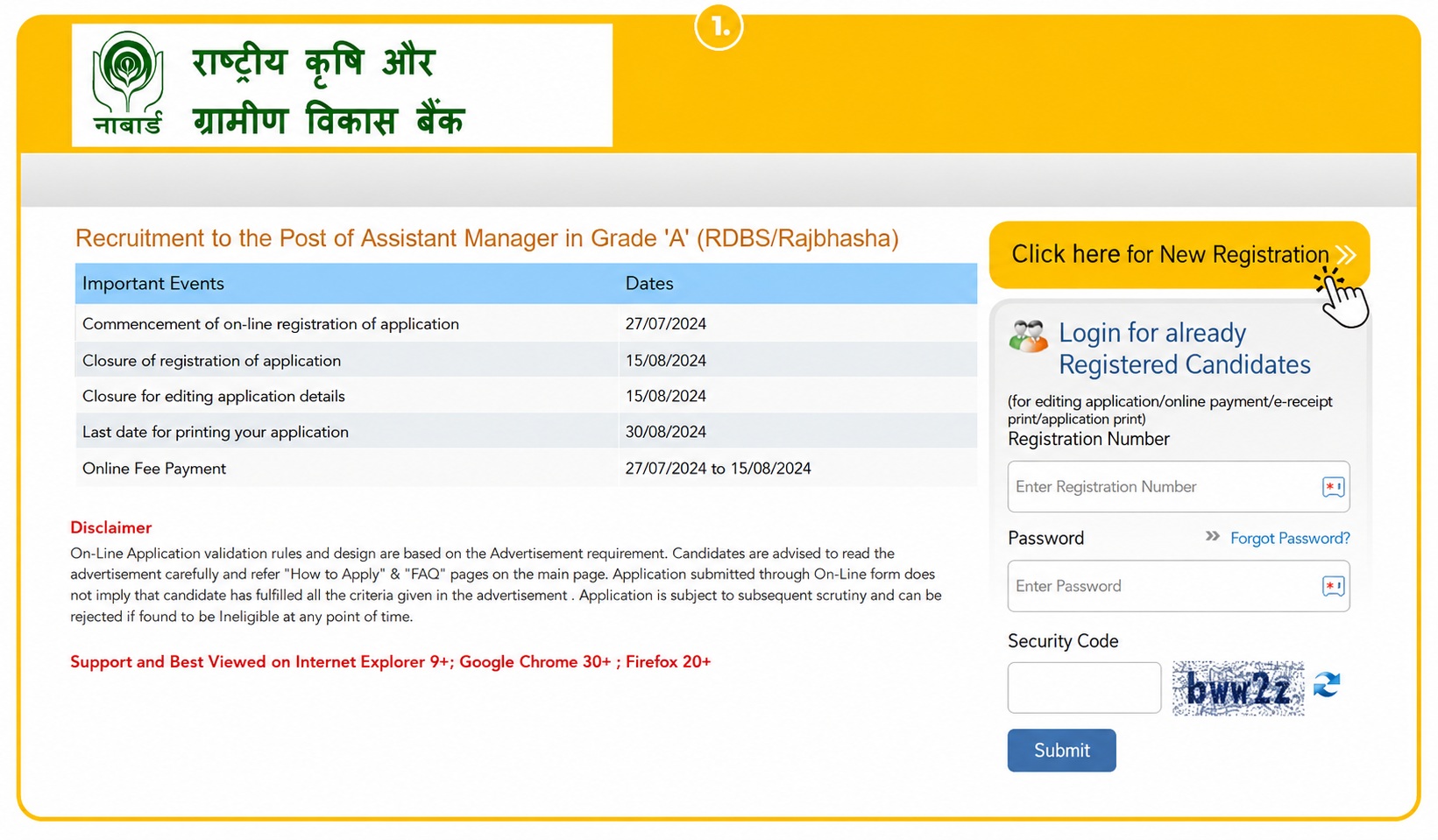
Fill the Application Form
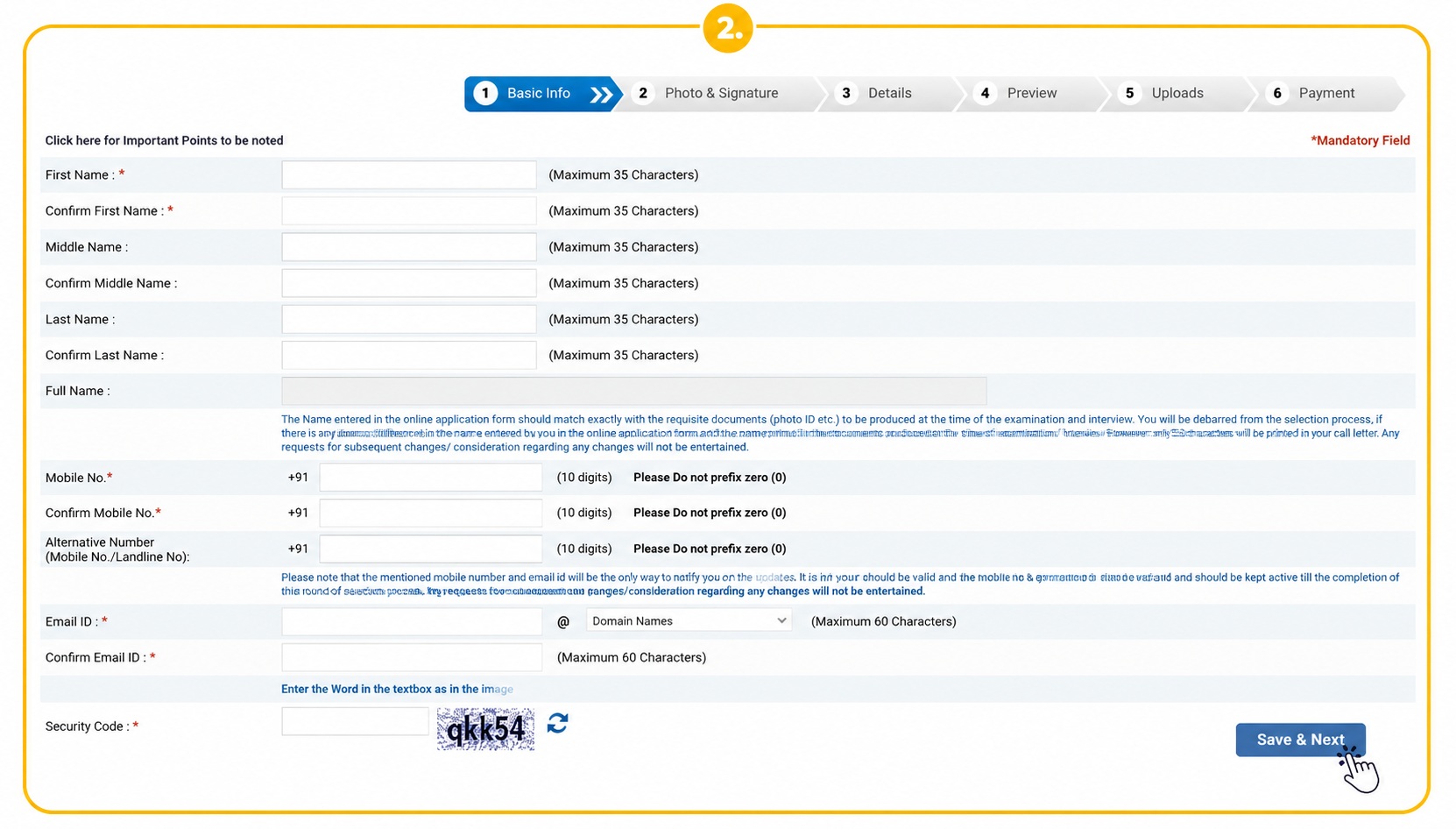
Step 02: You'll land on the NABARD Application Form. Enter all your information and click "Save and Next." Once done, you'll be shown a 9-digit "Provisional Registration Number" along with your Password.
Note: Save these details for future logins. Don't forget or lose your login credentials, as recovering them can be quite difficult.
Note: You'll be taken to the next section of the page, where the 9-digit Provisional Registration Number and Password will appear.
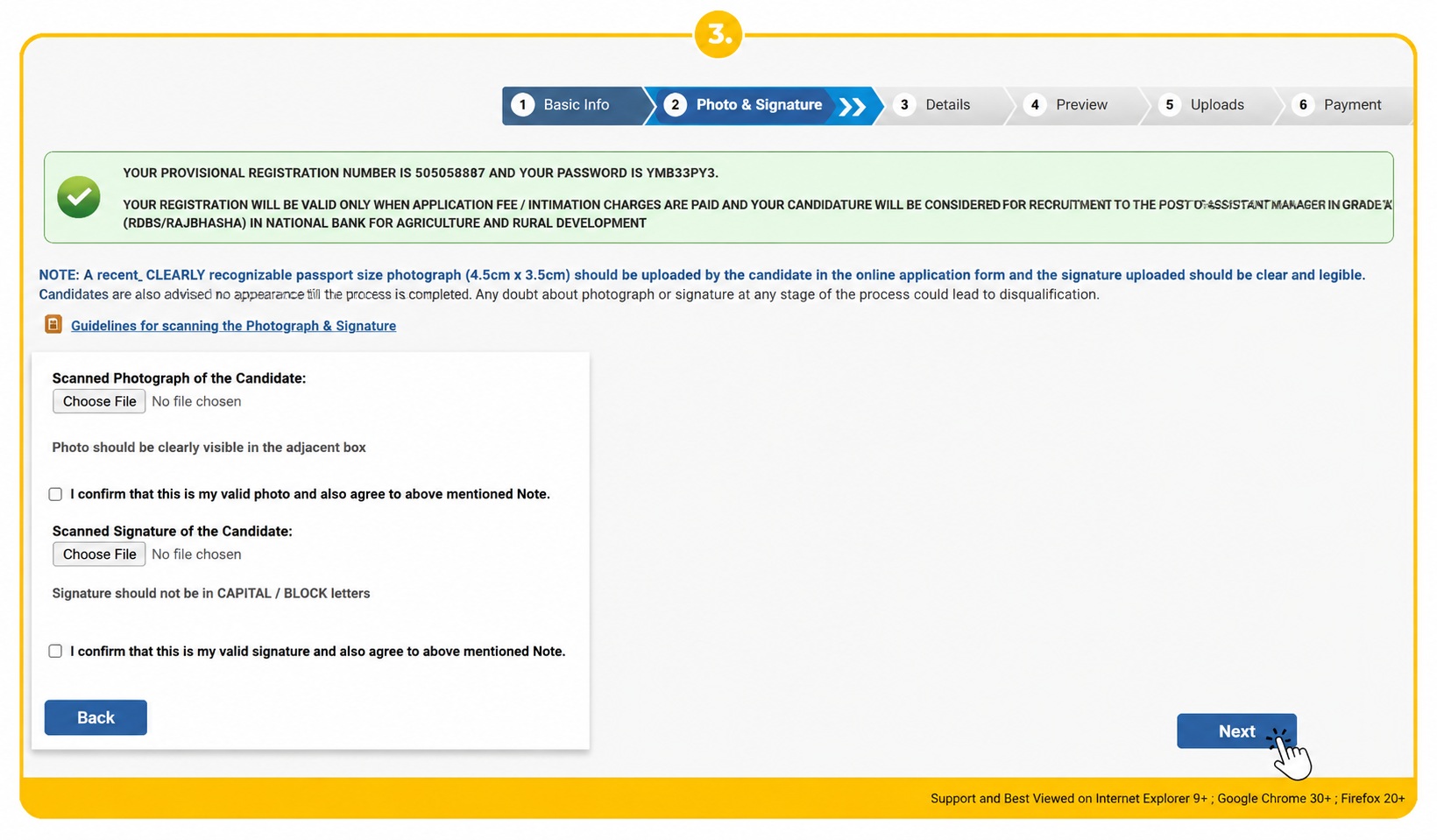
Step 03: Upload your Photograph (4.5cm × 3.5cm) and Signature (in black ink) on this page.
Note: Your photograph should be 20kb–50kb, and your signature should be 10kb–20kb. Click Next.
Next, tap "CLICK HERE FOR NEW REGISTRATION."
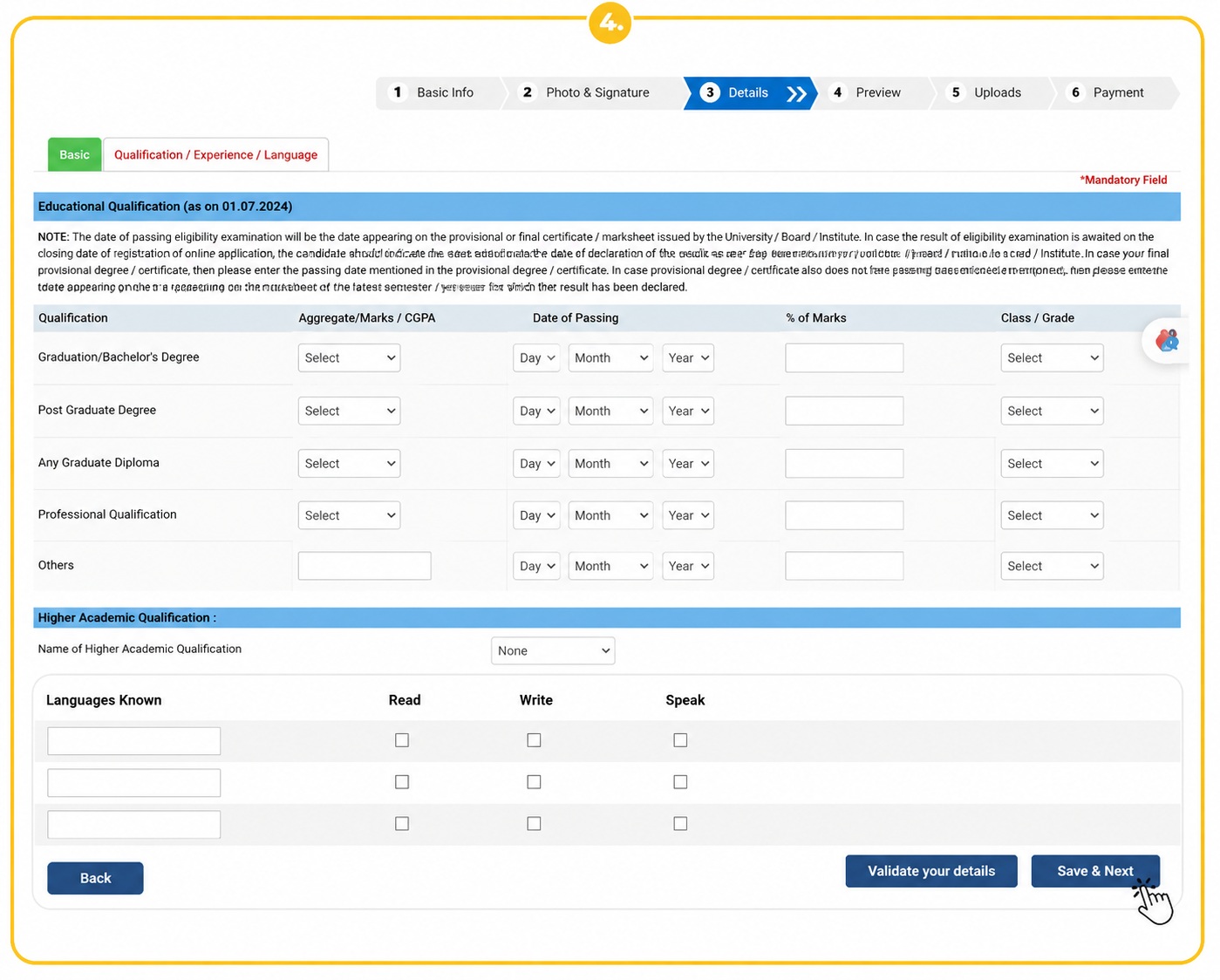
Step 04: A new page will open with two sections, the first covering Basic details, and the second covering Qualification, experience, language, and exam centre (you can check the list of exam centres in the linked eligibility guide), among others.
Fill in all the necessary details and click "Save & Next."
Verify Details & Complete Registration
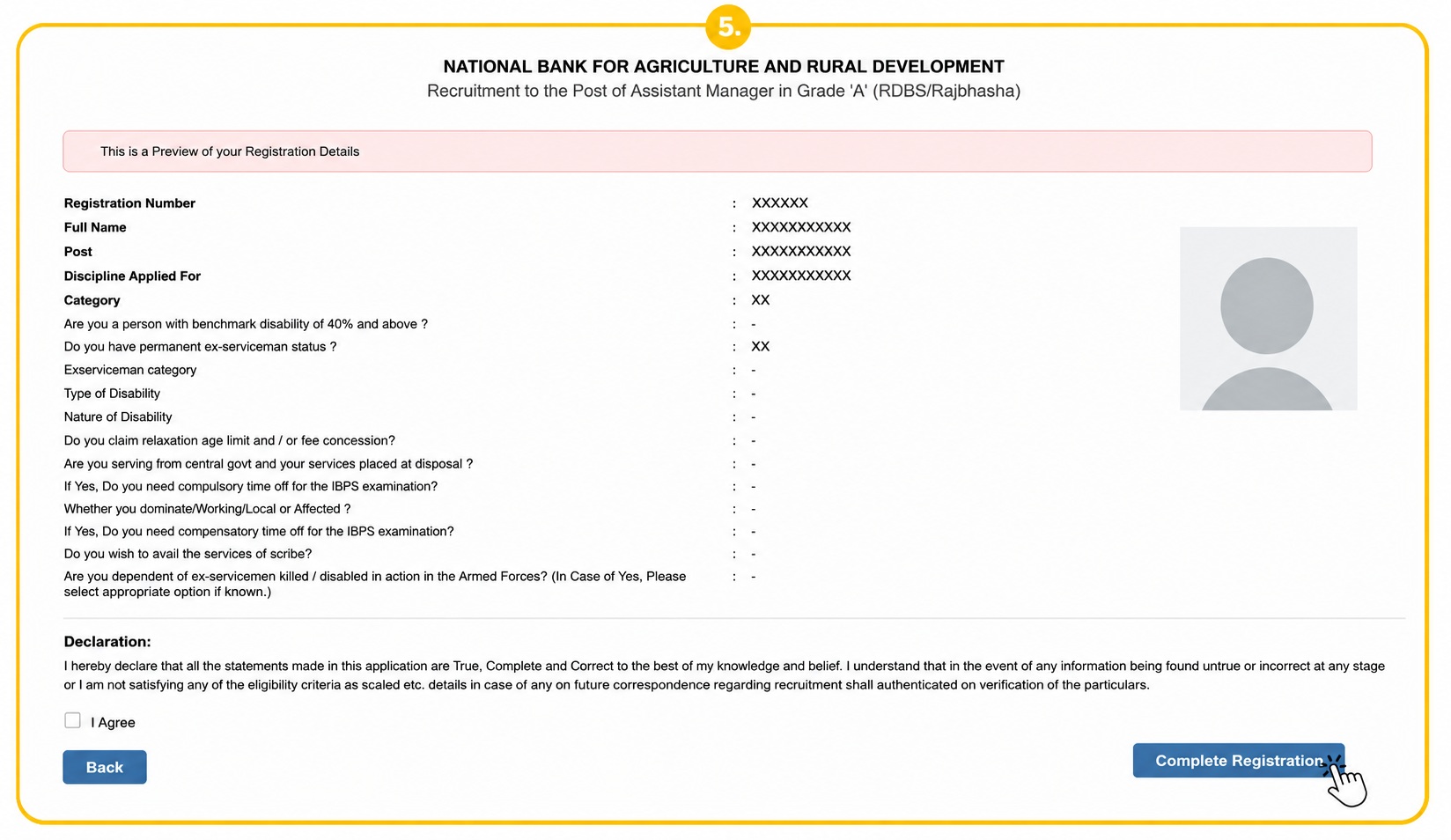
Step 05: A preview section will appear. Review every detail carefully, as this is your last chance to make changes, then click "Complete Registration" at the bottom right.
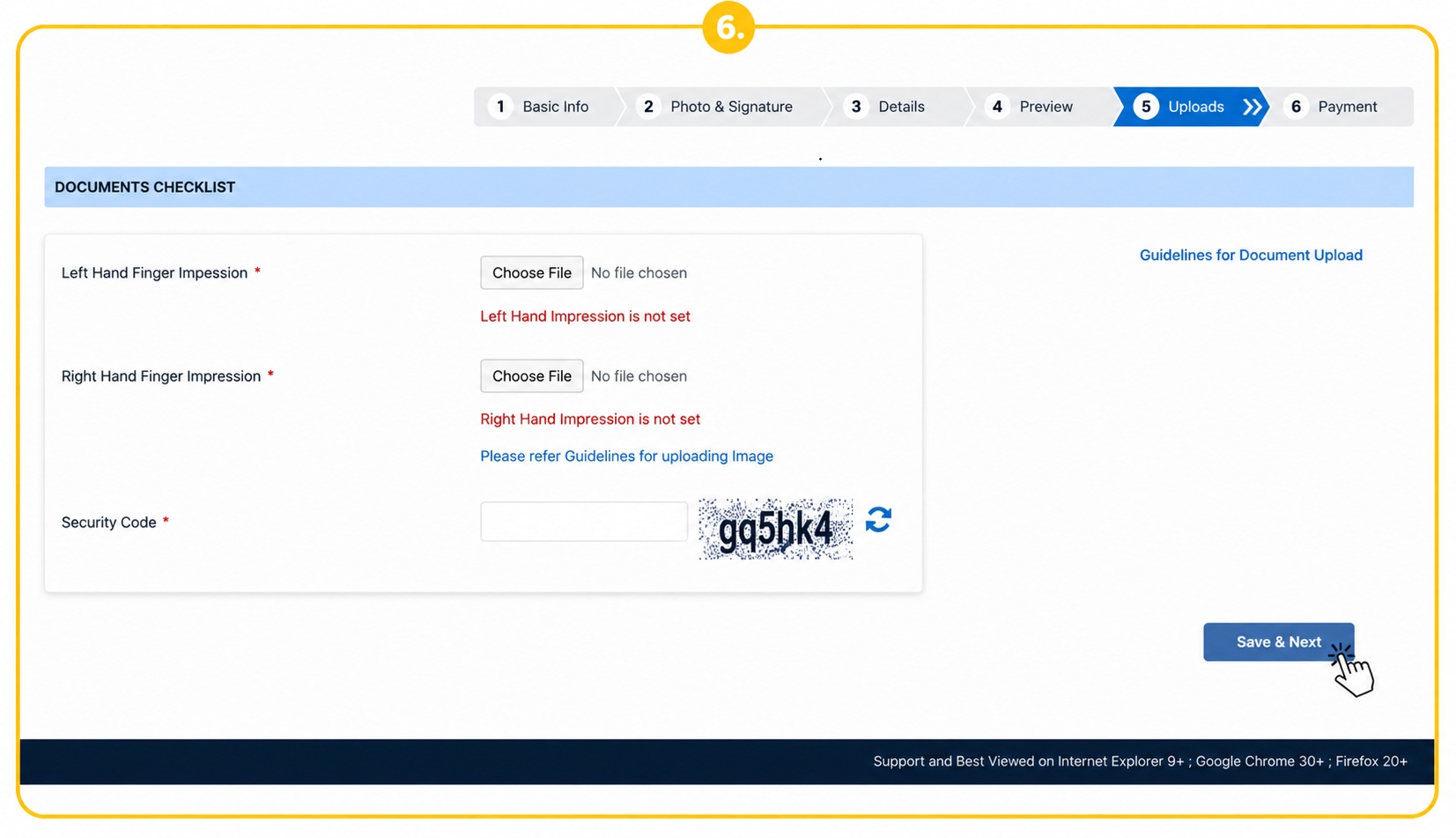
Step 06: Upload your Thumb Impression (3cm × 3cm) and Handwritten Declaration (10cm × 5cm) on this page. The thumb impression should be 20kb–50kb, and the handwritten declaration should be 50kb–100kb. Click Next.
Handwritten Declaration: A statement in which the candidate declares that all information submitted in the application form is correct, true, and valid, and confirms they will present supporting documents when required.
Application Fee Payment & Download Receipt
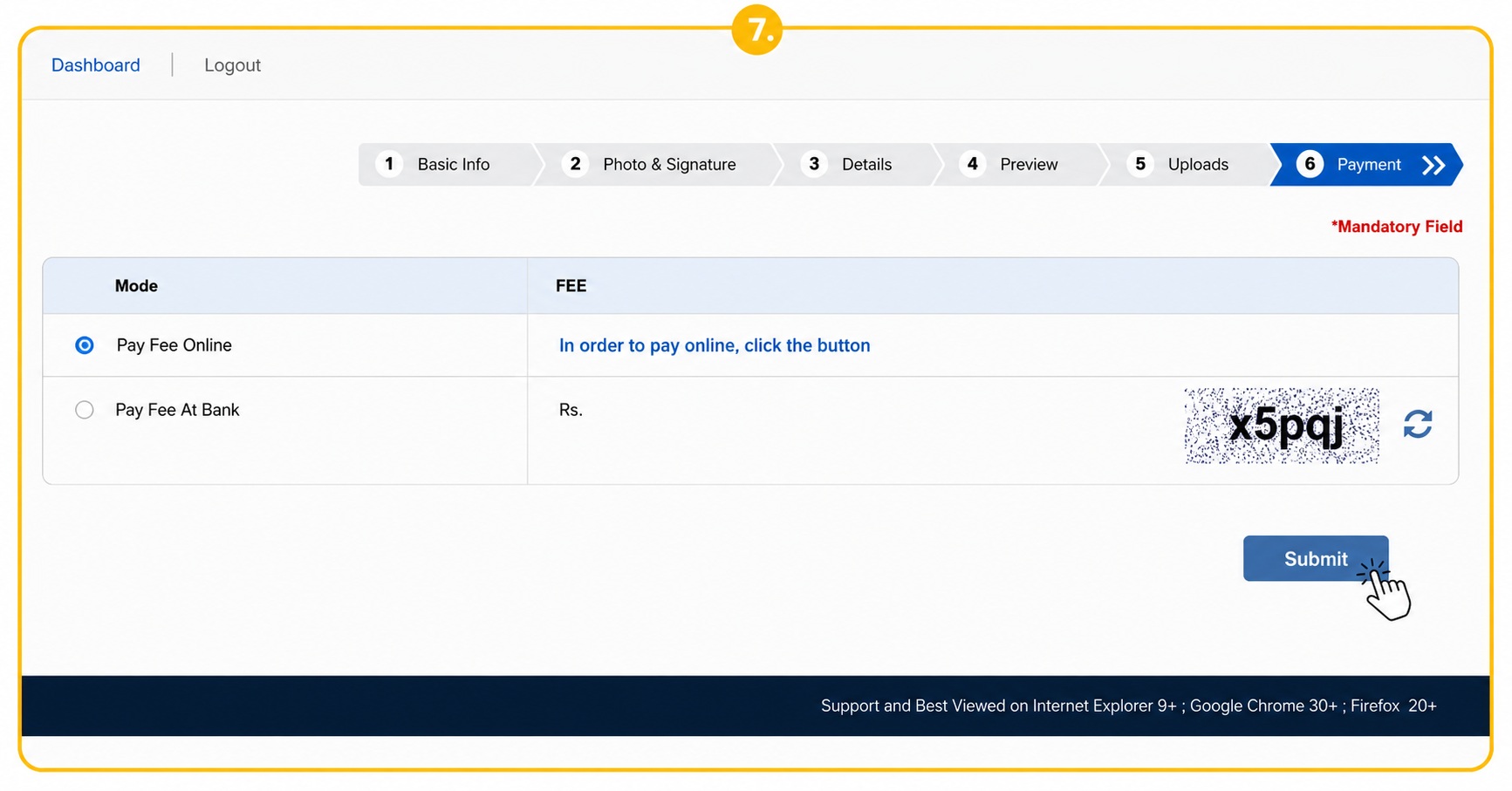
Step 07: Submit the NABARD Grade A form fee, enter the security code and complete payment via Credit Card, Debit Card, Internet Banking, Wallet, Cash Card, QR Code, or UPI.
Note: These steps have been laid out based on the official notification.
Once you've applied for NABARD Grade A, it's time to focus your energy on preparing for the exam. Some valuable study resources are available in a separate linked guide to support your preparation.
What are the required documents for the NABARD Grade A online application?
While filling out the NABARD Grade A 2025 application form, candidates need to upload certain documents in the specified formats.
Make sure all documents are in JPG/JPEG format and meet the required size and dimension guidelines. It helps to keep these ready in advance for a smoother process:
Passport Size Photograph
- The photograph should be a recent, colour, passport-size image against a light-coloured (preferably white) background.
- Look directly at the camera with a clear, relaxed expression. Avoid harsh shadows, red-eye, and reflections from glasses.
- Religious headwear is permitted, provided the face remains clearly visible.
- Dimensions: 200 x 230 pixels (preferred)
- File Size: 20 KB – 50 KB
Signature
- Sign on plain white paper using a black ink pen.
- The signature must be your own — no one else may sign on your behalf.
- Dimensions: 140 x 60 pixels (preferred)
- File Size: 10 KB – 20 KB
- Signatures written in capital letters will not be accepted.
- The uploaded signature must match the one you provide during the exam.
Left Thumb Impression
- Place your left thumb impression on white paper using black or blue ink.
- Dimensions: 240 x 240 pixels (3 cm x 3 cm at 200 DPI preferred)
- File Size: 20 KB – 50 KB
- Format: JPG/JPEG only
Handwritten Declaration
- Dimensions: 800 x 400 pixels (10 cm x 5 cm at 200 DPI preferred)
- File Size: 50 KB – 100 KB
- Format: JPG/JPEG only
- The exact wording for the declaration will be provided in the official notification.
- It must be written in English only, clearly, on white paper, using black ink.
- It must be written by the candidate personally. Declarations written in capital letters will not be accepted.
Guidelines for Uploading Documents
- An unclear photograph or signature can lead to rejection of your application.
- After uploading, verify that all images — photo, signature, thumb impression, and declaration — are clear, correctly sized, and placed in the right fields.
- If any file appears blurred, smudged, or has been uploaded to the wrong field, you can edit the application and re-upload it before final submission.
- The signature and handwritten declaration must not be written in capital letters, or they will be rejected.
- Make sure your uploaded photo shows your face clearly, without shadows, red-eye, or glare from glasses.
- The uploaded signature must match the one you provide at the exam centre; a mismatch could lead to disqualification.
- Always keep a printout of your completed online application for future reference.
- Make sure you upload all 4 required documents — photograph, signature, left thumb impression, and handwritten declaration — meeting the specified pixel and file size requirements.
- Ensure the photograph is clear, and that the signature and declaration are not written in capital letters.
How to Upload Documents in the NABARD Grade A Application Form Correctly
While filling out an NABARD Grade A application form, an error message showing an upload failure can appear on screen — often the result of a small mistake made during the document upload step.
A single upload error can cause the entire application to fail, so it's important to upload documents correctly according to the specified requirements.
Here's a closer look at the most effective way to upload all the necessary documents successfully.
Uploading Procedure
- Use Dedicated Links: Use only the separate upload links provided in the online form for each document — Photograph, Signature, Left Thumb Impression, and Handwritten Declaration.
- Browse and Select: Navigate to the folder on your device where the scanned documents are saved, and select them one at a time.
- Click Open/Upload: Once the correct file is selected, click "Open/Upload" to transfer it to the NABARD portal.
Checking Format and Managing Errors
- Verify Format: Confirm your file matches the required size and format before uploading, to avoid upload failures.
- Check for Visibility: Ensure the thumb impression and declaration are clearly visible before clicking final submit.
Final Confirmation
- Registration of Online Application: The application isn't considered complete until all four required documents — Photo, Signature, Left Thumb Impression, and Declaration — have been uploaded.
- Edit Before Submission: There's an option to edit and re-upload these documents before clicking final submit if any quality issues are spotted.
- Record Keeping: Take a printout of the system-generated online application form for future reference.
Uploading documents correctly, as specified, is key to a successful final submission and helps avoid errors in the application form.
What are the Guidelines for filling the NABARD Grade A Application Form 2026?
Before filling out the NABARD Grade A application form, it helps to understand the steps clearly. A small slip-up during the apply-online process can lead to rejection, so candidates should fill in all details with care.
- Apply Online Only: The NABARD Grade A application form can only be submitted through the official website; offline applications are not accepted.
- Check Eligibility: Before starting the apply-online process, confirm that you meet all the required eligibility criteria.
- Keep Documents Ready: Have your photograph, signature, thumb impression, and handwritten declaration ready in the correct format before applying.
- Fill Details Carefully: Enter all personal and educational details accurately while filling the form, since no changes can be made after final submission.
- Upload Documents Properly: Ensure all documents are clear and uploaded in the required size and format to avoid rejection.
- Preview Before Submit: Always review the application form before final submission to catch any errors.
- Pay Application Fee: Complete the apply-online process by paying the application fee through an online mode.
- Download Application Form: After submission, download and keep a copy of the application form and fee receipt for future reference.
Following these steps will help ensure a smooth NABARD Grade A online application process, free of avoidable mistakes.